
Hustler Words – While the Apple Watch is widely recognized for its robust health and fitness tracking capabilities, it possesses an equally potent, though often overlooked, potential: to act as a crucial catalyst for boosting personal and professional productivity. For those prone to smartphone distractions, this wearable device presents a discreet yet powerful means to maintain focus and achieve daily goals. Although Apple’s native applications like Reminders and Calendar offer basic organizational tools, a deeper dive into third-party offerings reveals a suite of sophisticated apps specifically engineered to supercharge your efficiency.
Here’s a breakdown of top Apple Watch applications that can transform your wrist into a hub of productivity:
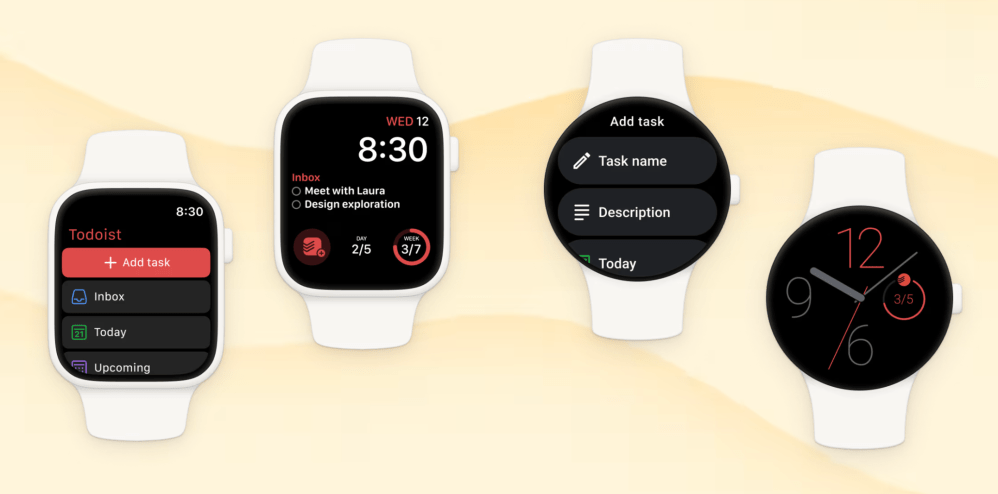
Todoist
Leading the charge in task management is Todoist, an indispensable application for Apple Watch users seeking to streamline their workflow without constantly reaching for their iPhone. This versatile tool empowers users to effortlessly create, oversee, and categorize tasks into distinct projects, mark them as finished, and configure timely alerts. Inputting new items is seamless, supporting both voice commands and the watch’s keyboard. Its strength lies in providing immediate, at-a-glance access to information, whether it’s checking a shopping list or quickly noting down an idea, thereby minimizing phone-induced interruptions. Users can also integrate Todoist directly into their Watch face, displaying vital metrics like their next scheduled task or daily completion percentage. While a robust free tier is available, a premium subscription at $4 per month unlocks advanced functionalities such as personalized reminders, an AI assistant, and an integrated calendar view.

Related Post

Drafts
Addressing the absence of a native Notes application on watchOS, Drafts emerges as an excellent digital scratchpad for spontaneous ideation. It allows users to capture fleeting thoughts and critical information directly from their wrist using voice dictation, the Scribble feature, or the on-screen keyboard. The application’s inbox, which synchronizes seamlessly with your iPhone, provides an overview of all drafts, including a count of flagged items for swift retrieval of priorities. Designed for immediate input, Drafts opens to a blank canvas, ensuring no interruption to your creative flow. Notes can be meticulously organized into folders or left as a free-form collection. A free version offers core capabilities, with a $1.99 monthly subscription unlocking premium features like custom themes and the ability to forward emails directly into the app.
Focus
For those who thrive on structured work intervals, Focus offers a dedicated productivity timer to enhance concentration. This application meticulously divides work periods into manageable "Focus Sessions," promoting undivided attention on a single task before transitioning. Leveraging the Apple Watch for these sessions inherently reduces smartphone-induced distractions, enabling users to quickly check remaining time with a mere glance at their wrist, then immediately re-engage with their work. The app also intelligently prompts users to incorporate vital breaks, fostering sustainable productivity. Focus is accessible via a $7.99 monthly subscription.
AutoSleep
Optimizing rest is crucial for peak productivity, and AutoSleep stands out as a premier Apple Watch application for comprehensive sleep tracking. This highly-regarded app delivers profound insights into various sleep metrics, including quality, heart rate variability, and consistency, alongside tracking sleep onset time and overall efficiency. Presenting data through an intuitive clock view adorned with "sleep rings"—reminiscent of the Watch’s Activity Rings—users gain an immediate understanding of their nocturnal patterns and whether they’re achieving adequate rest. A standout feature is its "readiness" score, which assesses mental and physical preparedness for the day based on sleep quality, mirroring advanced wellness trackers like the Oura Ring. AutoSleep also provides personalized recommendations for optimal bedtime to improve sleep hygiene. A one-time purchase of $5.99 grants full access.
Streaks
For cultivating positive routines and monitoring personal growth, Streaks offers a gamified approach to habit formation. This application incentivizes daily consistency: successfully completing a task extends your "streak," while missing a day resets it. Users can meticulously track up to 24 distinct habits, from dental hygiene to language practice or dietary goals. Streaks also accommodates non-daily objectives, allowing for flexible scheduling, such as weekday commutes, bi-weekly gym sessions, or weekend dietary restrictions. The Apple Watch interface provides immediate visibility into daily tasks, progress updates, and effortless task completion with a simple tap. This powerful habit tracker is available for a single payment of $5.99.
Fantastical
Elevating calendar management on your wrist, Fantastical provides a sophisticated platform for maintaining organization directly from your Apple Watch. Users can seamlessly create events and configure timely reminders, all accessible with a swift glance. The watchOS application offers three distinct viewing modes: "Up Next" provides an immediate snapshot of your impending appointment coupled with current weather conditions; the "List" view presents a comprehensive overview of upcoming events and tasks for the ensuing days, complete with weather forecasts; and the "Tasks" view consolidates all pending items, allowing for quick completion. Furthermore, Fantastical delivers proactive alerts for scheduled events and tasks. For persistent visibility, its Smart Stack widget offers a dynamic calendar preview directly on your watch face. Access to Fantastical is available for $4.99 per month.
Things 3
For a comprehensive approach to personal and project management, Things 3 stands as a robust productivity suite. This application excels at facilitating to-do list creation, project oversight, and progress tracking towards overarching objectives. It enables users to segment various life domains—be it personal, professional, or financial—into dedicated "Areas" for meticulous organization. Key features include integrated reminders, calendar synchronization, customizable widgets, and tagging capabilities for granular categorization. Things 3 also supports automated recurring tasks and includes a unique "This Evening" section for after-hours planning. Throughout the day, users can effortlessly mark tasks as complete or add new ones directly from their wrist. Things 3 is available for a one-time purchase of $9.99.
Structured
Simplifying daily planning, Structured unifies your calendar, to-do lists, habit tracking, reminders, and routines into an intuitive, chronological timeline. Navigating this structured overview directly on your wrist allows for seamless monitoring of upcoming tasks and adherence to your schedule, eliminating the need to consult your phone. The app provides an Inbox for quickly jotting down ideas and notes for later organization, and supports breaking down complex projects into granular "sub-tasks." Visual customization is a highlight, with options to personalize tasks using diverse icons and colors for enhanced clarity. Structured ensures continuity across your Apple ecosystem, syncing effortlessly with Mac, iPhone, and iPad. While core functionalities are offered for free, a $6.49 monthly subscription unlocks advanced features, including AI-powered task drafting and planning.



Leave a Comment